
Download echodocs ai – AI‑Powered Audio‑to‑Text Transcription Tool
Overview: Transform Audio to Text with echodocs ai
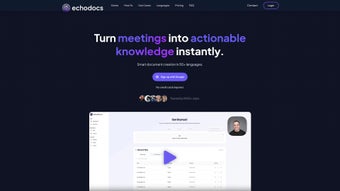
echodocs.ai is a cloud‑based transcription platform that converts spoken audio into accurate, searchable text in a matter of minutes. Built on state‑of‑the‑art deep‑learning models, the service recognises a wide variety of voices, accents, and recording environments, delivering word‑level precision that rivals human transcriptionists. The interface is intentionally minimalist: after logging in, you can drag‑and‑drop files, select language and speaker‑detection options, and watch a live progress bar as the AI works behind the scenes.
Security is a core pillar—TLS 1.3 encrypts every upload, and all files are stored on ISO‑27001‑certified servers before being automatically purged after 48 hours. This makes echodocs.ai suitable for sensitive sectors such as legal, healthcare, and finance, where confidentiality cannot be compromised. Subscription plans are tiered to accommodate freelancers, small teams, and enterprise‑level users, while a generous free trial grants 30 minutes of transcription without a credit‑card requirement.
Whether you need a single lecture transcript, a batch of interview recordings, or an integrated API for continuous workflow automation, echodocs.ai provides a scalable, reliable solution that saves time, reduces costs, and improves accessibility of audio content.
Key Features & Benefits of echodocs ai
- Multi‑Format Support: Accepts MP3, WAV, AAC, OGG, FLAC, and many other audio containers, removing the need for pre‑conversion tools.
- AI‑Driven Accuracy: Deep‑learning models trained on millions of hours of speech achieve >95 % word‑level accuracy on clear recordings.
- Speaker Identification: Automatically detects and labels multiple speakers, a crucial feature for meetings, panels, and podcasts.
- Timestamp Insertion: Generates time‑coded transcripts that sync perfectly with video or audio playback.
- Secure Cloud Processing: All data is encrypted in transit and at rest; files are deleted after 48 hours to protect privacy.
- Real‑Time Inline Editing: Built‑in editor lets you correct errors, add comments, and export in DOCX, PDF, TXT, or SRT formats.
- Batch Upload & RESTful API: Power users can automate bulk transcription and integrate the service into existing pipelines using standard HTTPS/JSON calls.
- Cross‑Platform Accessibility: Works on any modern browser, meaning no installation is required on Windows, macOS, Linux, Android, or iOS devices.
- Flexible Pricing Model: Choose pay‑as‑you‑go minutes, monthly subscriptions, or custom enterprise contracts; a free trial includes 30 minutes of transcription.
- Continuous Model Updates: Monthly improvements to language models and UI enhancements are rolled out automatically, keeping the service current.
These capabilities combine to make echodocs.ai more than a simple transcription widget; it becomes a central hub for any workflow that relies on spoken content. For educators, the speaker‑identification and timestamp features simplify the creation of lecture notes that students can navigate chapter by chapter. Journalists appreciate the rapid turnaround and secure handling of interview recordings, while legal professionals value the confidentiality guarantees and ability to export transcripts directly into case‑management systems. The platform’s API also enables developers to embed transcription into custom applications, ranging from e‑learning portals to customer‑support ticketing tools, without worrying about server‑side processing or model maintenance. In short, the feature set is designed to address the practical challenges of real‑world audio conversion while keeping the user experience frictionless.
Getting Started: Installation, Usage & Compatibility
Step‑by‑Step Setup (No Download Required)
Because echodocs.ai runs entirely in the cloud, there is no traditional software installation. All you need is a recent web browser (Chrome, Edge, Firefox, or Safari) and a stable internet connection. Follow these steps to begin transcribing:
- Navigate to https://echodocs.ai and click “Sign Up” to create a free account.
- Confirm your email address by clicking the link in the verification message.
- Log in and open the “Upload” dashboard from the main menu.
- Drag your audio file onto the upload area or use the “Browse” button to select it from your device.
- Select the source language, toggle speaker detection if needed, and press “Start Transcription”.
- Watch the real‑time progress indicator as the AI processes the file on remote servers.
- When the job finishes, review the auto‑generated transcript in the built‑in editor, make any necessary adjustments, and download in your preferred format.
Usage Tips for Maximum Accuracy
While the AI model handles a broad range of audio qualities, you can improve results by adhering to best‑practice recording techniques. Use a high‑quality microphone, record in a quiet environment, and keep speakers at a consistent distance from the mic. If you have a multi‑speaker session, consider recording each participant on a separate channel; the platform can then label speakers more reliably. Naming files with clear language and content tags (e.g., “EN_Interview_2024‑09‑20”) helps keep your library organised and simplifies batch processing via the API.
Operating System Compatibility
echodocs.ai is OS‑agnostic because all heavy processing occurs on remote servers. It works on Windows 10/11, macOS 12+, popular Linux distributions, Android 8+, and iOS 13+ as long as the device runs a modern browser that supports HTML5 and WebAssembly. The low local hardware requirements mean even older laptops or tablets can handle the UI smoothly, provided the network bandwidth is sufficient (recommended minimum 3 Mbps upload speed for optimal performance).
For organisations that need deeper integration, the RESTful API can be called from any server‑side language (Node.js, Python, Java, .NET, etc.) regardless of the underlying operating system. The API uses standard HTTPS authentication tokens and returns JSON‑formatted transcripts, making it straightforward to embed transcription into CRM systems, learning management platforms, or custom internal tools.
Pros, Cons, Frequently Asked Questions & Final Verdict
Pros
- High transcription accuracy thanks to cutting‑edge AI models.
- Supports a wide range of audio formats, eliminating pre‑conversion steps.
- Secure data handling with end‑to‑end encryption and automatic file deletion.
- Speaker identification and timestamps enhance usability for meetings and interviews.
- No client‑side installation; works on any device with a modern browser.
- Flexible pricing, including a free trial and pay‑as‑you‑go minutes.
- Comprehensive API enables automation and workflow integration.
- Regular updates keep the transcription engine current with language trends.
Cons
- Requires a stable internet connection; offline transcription is not possible.
- Subscription costs can add up for users with high‑volume, long‑form audio needs.
- Language support is limited to 12 major languages as of 2025.
- Complex audio with heavy overlapping speech may still produce occasional errors.
- Export formats are limited to common document types; no native integration with niche transcription software.
Frequently Asked Questions
How secure is my audio data on echodocs.ai?
All uploads travel over TLS 1.3, are stored on ISO‑27001‑certified servers, and are automatically deleted after 48 hours. Optional end‑to‑end encryption can be enabled for extra protection.
Can I use echodocs.ai on a mobile device?
Yes. The responsive web interface works on Android and iOS browsers, and the API can be called from native mobile apps if you need custom integration.
What languages are supported for transcription?
echodocs.ai currently supports English, Spanish, French, German, Italian, Portuguese, Dutch, Mandarin, Japanese, Korean, Russian, and Arabic. Additional languages are planned for future releases.
Is there a free tier or trial?
A free trial provides 30 minutes of transcription without requiring credit‑card details. After the trial you can switch to a pay‑as‑you‑go plan or a monthly subscription.
How do I integrate echodocs.ai with my existing workflow?
Use the RESTful API to programmatically upload audio, retrieve transcripts, and store them in your content‑management system. Detailed documentation and code samples are available in the developer portal.
Conclusion: Should You Download echodocs ai?
If you regularly need to turn spoken content into written text, echodocs.ai offers a secure, accurate, and frictionless solution. Its AI engine, speaker‑identification, timestamps, and flexible export options make it especially valuable for professionals handling interviews, lectures, legal depositions, or podcast episodes. While a reliable internet connection is mandatory and the pricing may become significant for heavy users, the time saved compared with manual transcription is substantial. The free trial allows you to test the platform’s performance on your own audio files without commitment.
Ready to streamline your workflow? Download echodocs ai now and start turning audio into searchable, editable text within minutes.



.png)



